
Experimenting with AI agents in my home network
I recently wrote a blog post about how a bottleneck in automation can be overcome with AI. In that post I argued that traditional automation hits a bottleneck because human logic becomes the limiting factor and that AI can start to break through it. But I also described my feelings, as a techy, seeing “prompt engineering” as the core programming and configuration language.
Whilst this still feels odd, I’ve been working more with AI Agents and the power of this abstracted layer is exciting to say the least.
In my home network setup, I look after traffic and services that my demanding household needs (which includes two teenage children). They are tough customers, five nines uptime isn’t enough, network administration and sysadmin is a full time job in my house  .
.
My home lab – a full time job
For obvious reasons I’ll not post too many details, but at a high-level my home lab has a hypervisor layer containing a virtualised firewall and a server that runs numerous containers for the different services, as well as a NAS. The network is made up of various vlans for segregation, and multiple access points with associated SSID’s for each segregation dotted around the house.
It’s as simple as I can make it to keep it reliable and resilient for “the customer” but allows scope to explore, expand and experiment.
I started exploring the main tasks that I had to complete on a regular basis: updating, patching and verifying changes across the server and containers was the most common that could sink the most of my time.
Outside of the regular maintenance was the ad-hoc requests that were always more interesting and needed more thought and effort. For example my Son’s PlayStation would get attached to the AP furthest away from it in the house and get poor latency. The solution, putting MAC address filtering on that AP for the PlayStation is straight forward enough, but needed some re-familiarisation and effectively more of my time to action.
Automate automate automate…
Taking these two examples at the opposite end of the scale, I started experimenting with n8n as the platform, deploying it containerised within my network. The speed that I was able to create a workflow that connected and did as I asked was pretty astonishing. $5 credit added to my OpenAI account and we were off  .
.
The trust layer
But with great automation, comes great anxiety.
Just as I’m not giving my son the keys to the kingdom and letting him make changes on the network, there has been a large hurdle for me to allow another entity to even look at the details of my home lab (it’s a personal thing).
I’m treating my new AI agents as another human being, and just as you would with a new team member, they need additional guidance and supervision. However unlike in real life, I’m ok with the micro-management and being seen as the all seeing Big-Brother.
Another aspect of the trust issues I have, is having an external entity access and administer my network. However the challenge is I run the n8n service containerised on the main server, if it goes down, I’ve lost the very tool that is supposed to tell me it’s down. There are more than enough solutions to solve this, but first my trust levels needs to increase to allow this outside of my walled garden - I’m still proving the value.
All that being said, am I comfortable with an AI agent (let’s consider hallucination for a moment) having the ability to make changes to the network and system? No I am not, well, just like a junior member of the team, if you run it past me first I’d be more comfortable.
Human in the loop – a remedy for anxiety
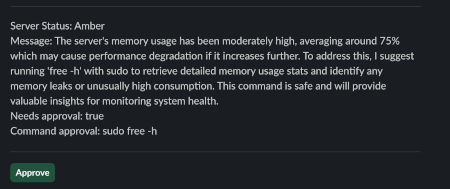
In steps Human-in-the-loop (HIL), this is a process that n8n makes super simple, to make sure the AI agent is consulting with me before any changes are made.
For my workflows I’ve hooked this up to slack, whenever there is a command it wants to run that makes system or network changes, it has to get explicit approval from me, and it sits and waits until I’ve given it. It drops me a message to my Slack channel with all the details of what it’s asking to run and why and I decide from there.
As you can see from the screenshot, it tends to be an iterative approach, but again, this is because I want to know everything it’s running.
This is a massive comfort blanket to the trust issues, I can be more confident that it’s not going to do irreparable damage.
The speed advantage
If I think about the examples I’ve worked on through my workflows, how would I have done it before AI.
Take the patching as a simple example first, previously setting up cron jobs with logging and notifications on warnings took time I just didn’t have, compare that to what I just created that was light speed. Then there is the verification of the services, still needs a sanity check, and is “it’s up” enough? Truth be told, when it comes to the home lab it isn’t what brings the beans home so it never got a fully fledged solution for automating my patches, it’s not difficult to better.
Take a more complex solution - adding MAC address filtering on the AP, I wouldn’t attempt to automate this, as it is clearly an edge case that seldom happens, so would just handle as they happen. However the save here could be considerable, not only will I save time doing the steps to implement MAC address filtering, but I’ll not need to invest time in a complex automation ruleset to make it happen in the first place - just a well crafted prompt is all that is needed.
I have one more cherry I’m adding to this ecosystem, I run a documentation site locally that contains all documentation on how my network is set up and the reasoning behind the vlans etc. As the AI agents make changes, they also need to make sure the documentation is an accurate representation of its state - what a time saver.
What does this mean for the next admin?
The plan was always to bring my son into the fold to support in maintaining our uptime and increasing my resiliency by starting to look after the network and services. But what will that look like, will it be mainly adopting “prompt engineering” as the core skill, not a bad skill to have, but a worry that he might not understand the commands the AI agent is wishing to run: rm -rf /  .
.
Also, will he miss the skills of SSH’ing into a box and debugging what is happening. Well, no, as that’s where I’ll start him, but those skills will erode over time if not exercised.
What you should actually do about this
If you are running any kind of infrastructure, be that a home lab like me, a small business or enterprise environment, here’s what I’d recommend based on my experiments.
- Start small and constrained, pick just one annoying repetitive task that eats time but isn’t mission-critical.
- Human in the loop from day one, don’t wait until you trust it, start with approvals for everything. It’s easier to relax the controls then having to tighten them up after something goes wrong.
- Prompt engineering is just like writing watertight playbooks. You wouldn’t give a junior admin root and ask them to “work it out”.
- Keep the skills in check. It will do something unexpected, you need to make sure you and the team have the skills to remedy and resolve.
You or your team is starting the shift from execution to oversight, you are no longer the person running the commands, you are the person deciding what commands to be run, it’s a different skill we need to continually develop.
Closing thoughts
I’ve only scratched the surface of what the automations can do with the power of AI agents, I’ve found it is an investment like a new team member, I have to walk through the scenarios and think ahead on how I want the agent to behave and describe this to give it guardrails. To this end the real skill is the prompts and making it clear what the agent can and cannot do. This approach also means the edge cases are a future state to cross later once my confidence in the agent not nuking my network has increased and I can provide even more autonomy.
Wrongly or rightly, I treat the agents like they are humans (I don’t think I’m the only one: remember your pleases and thank you’s). In this home lab situation, in my mind they have the capability of a seasoned sysadmin with all the experience to boot, but have the mental age of a four year old. It helps me write the prompts to keep them contained to what I want them to do and no more.
This was a follow up post to first exploring the automation platforms, that was one of questioning the logic as a developer. Spending more time I’m an advocate and a promoter, up to a point.
I’m not hanging up my SSH keys just yet; the overall goal would be to achieve a self healing network in my home lab, but let’s not forget the reason I have a home lab in the first place: keeping close to the tech and I still want to keep those skills for a while yet, however one of the new skills I’m sharpening is for the prompt box.